Live Captions for the nanoStream Dashboard v2 Release
Until now, using AI-powered Live Captions typically required a technical setup and the API integration.
This release brings real-time captions configuration directly into the nanoStream Dashboard, allowing our users to start benefiting from real-time captions quickly while still keeping the API available for advanced workflows.
Enable Live Captions now to turn speech into real-time captions and translations — automatically as soon as your stream goes live.
Changelog
Added
Dashboard-based Live Captions setup
Configure Live Captions during stream creation:
- save the configuration
- select the Live Captions engine
- choose the source language (the language spoken in the stream)
- choose one or more target languages (generate captions in multiple languages simultaneously)
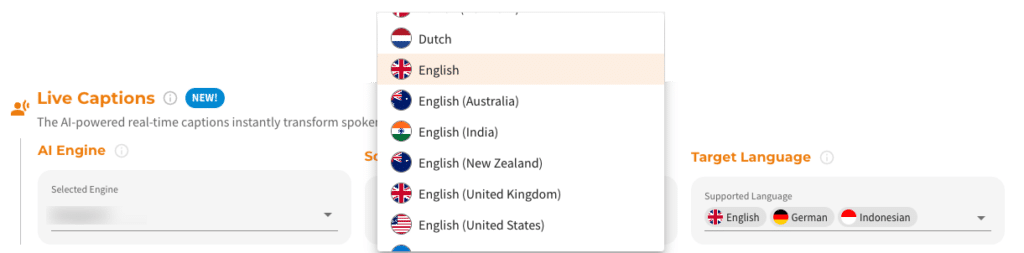
Screenshot: Adding live captions during stream creation
Live Captions management in multiple Dashboard locations
Create/edit/remove configuration:
- during stream creation
- or in the Live Captions Overview “Setup” tab
- later in the Stream Overview “Captions Playout” tab
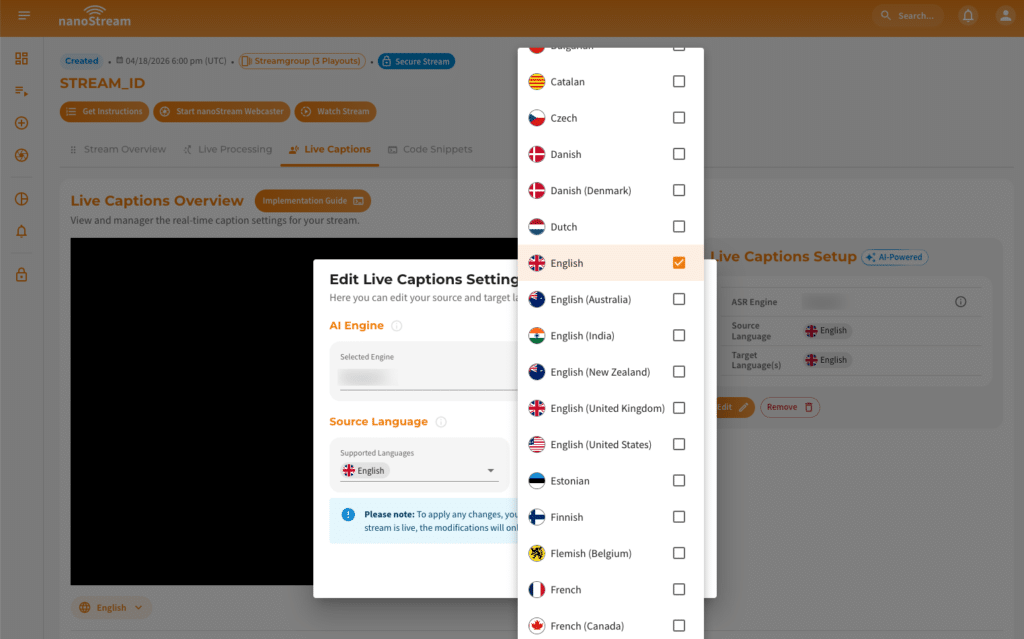
Screenshot: Editing Live Captions settings
Auto-generated code snippets
Each live stream with real-time captions now includes a unique embed snippet that’s automatically updated to match your Live Captions setup.
You can choose between:
- Live Captions Player code snippets or
- the iFrame embed tag (recommended for the quickest integration)
Expanded Language Coverage
This release supports captioning and translation in 45 languages, including region-specific variants with more languages to follow within upcoming releases:
- Bulgarian (
bg) - Catalan (
ca) - Czech (
cs) - Danish (
da) - Danish (Denmark) (
da-DK) - Dutch (
nl) - Flemish (Belgium)
(nl-BE) - English (Generic) (
en) - English (United States) (
en-US) - English (Australia) (
en-AU) - English (United Kingdom) (
en-GB) - English (India) (
en-IN) - English (New Zealand) (
en-NZ) - Estonian (
et) - Finnish (
fi) - French (Generic) (
fr) - French (Canada) (
fr-CA) - German (Generic) (
de) - German (Switzerland) (
de-CH) - Greek (
el) - Hindi (
hi) - Hungarian (
hu) - Indonesian (
id) - Italian (
it) - Japanese (
ja) - Korean (Generic) (
ko) - Korean (South Korea) (
ko-KR) - Latvian (
lv) - Lithuanian (
lt) - Malay (
ms) - Norwegian (
no) - Polish (
pl) - Portuguese (Generic) (
pt) - Portuguese (Brazil) (
pt-BR) - Portuguese (Portugal) (
pt-PT) - Romanian (
ro) - Russian (
ru) - Slovak (
sk) - Spanish (Generic) (
es) - Spanish (Latin America) (
es-419 - Swedish (Generic) (
sv) - Swedish (Sweden) (
sv-SE) - Turkish (
tr) - Ukrainian (
uk) - Vietnamese (
vi)
Note: Integration into your playback system or application is required.
Dashboard Walkthrough
Watch the quick walkthrough to turn on Live Captions directly in the Dashboard and and configure languages for your stream, so you can go live with real-time captions quickly.
Documentation
- Full feature overview, prerequisites, supported engines/languages, and Dashboard setup flow: https://docs.nanocosmos.net/
Questions?
Provide your live caption preferences via the contact form or by sending an email to sales@nanocosmos.net.
For technical questions, you can use our support form.